

Key Takeaways
- Without a cloud data warehouse, HubSpot's Data Source Ingestion API is often the lightest HubSpot-native way to keep core banking data current, as long as someone owns the extract.
- Your team builds and maintains scheduled extracts, one per source system. Each runs on a schedule you set, and after the first load, it sends only the records that changed.
- It requires Data Hub Pro and some technical capacity, but no warehouse and no middleware contract.
If you work in marketing, member experience, or data at a credit union or bank, you've probably run into this wall: the information you need to actually personalize outreach (account type, product holdings, relationship tenure) lives in your core banking system. Your CRM and/or marketing automation system doesn't know any of it. So your auto loan campaign goes out to members who already have an auto loan with you.
Closing that gap has traditionally meant one of two expensive paths: standing up a cloud data warehouse, or paying a middleware vendor to build and maintain an ETL pipeline. Both work, but both take months and budget most teams don't have lying around.
There's a third option, and it's new: HubSpot's Data Source Ingestion API reached general availability in September 2026. It's a more direct, lower-maintenance way to get core system data into HubSpot, and for institutions without an existing data warehouse, it's often the lightest HubSpot-native path.
Why is core banking data so hard to get into HubSpot?
Core banking systems, digital banking platforms, and online application tools weren't built to talk to a CRM. Getting member or customer data out of them and into HubSpot in a usable, ongoing way usually means one of these:
- A cloud data warehouse connector: the cleanest option, but only if you're already on Snowflake, BigQuery, Databricks, Azure Synapse, or Amazon Redshift. If you're not, standing one up is its own project.
- A middleware ETL tool: a vendor extracts your data, transforms it, and hands it off to HubSpot. Low engineering lift on your end, but it comes with real setup cost and an ongoing contract.
- A custom build against HubSpot's Imports API: full control, no added HubSpot cost, but it's the heaviest lift. It writes directly to CRM objects and properties, which is why teams with strong engineering choose it. Your team owns the whole pipeline.
If none of those fit (no warehouse, no appetite for a vendor contract, no bandwidth for a from-scratch build), the Data Source Ingestion API is the option to look at now.
What is HubSpot's Data Source Ingestion API?
HubSpot's Data Source Ingestion API lets your team push core banking data into Data Studio on a schedule you set, as JSON, a CSV, or an Excel file. After the first load, only new or changed records need to be sent, and the data works alongside your standard CRM objects. It reached general availability in September 2026.
In plain terms: your team builds a scheduled data extract, or several if your core, loan origination system, and digital banking platform each feed in. HubSpot ingests it directly into Data Studio. No warehouse required, no third-party connector in between.
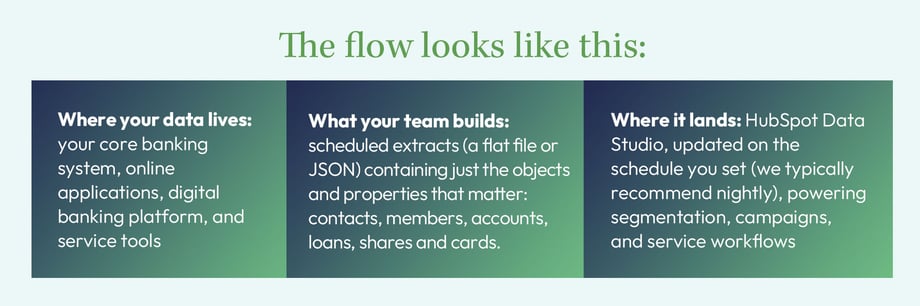
Many credit unions already have a nightly core export landing on an SFTP server. That file is often most of the way to what the Ingestion API needs.
Under the hood, it's an API endpoint your team (or a developer you work with) sends data to on a schedule. You define the columns once (name and type, like STRING, INTEGER, DATE), and after that, scheduled updates only need to push the records that changed. This is often called a delta sync: after the first load, your job sends only new or changed records, so you're not re-uploading your whole member base every night. Two limits to plan for: the incremental approach works with JSON data sources (a CSV or Excel upload replaces the whole data source), and each push is capped at 100,000 records, so a large first load needs to be batched.
A few things to settle up front, so a sync doesn't fail six months in:
- Adding properties later: HubSpot requires the updated schema to include every column that's already in use; you can't just tack on a new one and drop the rest. It's a minor guardrail, but worth flagging to whoever owns the extract.
- The unique ID: Every member record needs a unique ID, such as the member number, set as a unique identifier property in HubSpot. Don't match on email address. Emails change and households share them, which creates duplicate member records. This is the reason we build a custom data model in the first place. Store the member number as text so leading zeros survive. That same ID goes in the record ID column the data source schema requires on every row.
- Ownership: Name who maintains the extract when your core vendor changes a file layout. That's usually when unowned integrations quietly break. Check the ingestion status after each push and alert on failures.
- Closed accounts and departed members: A data push updates and appends rows but doesn't delete them, so use a status property to mark closed accounts and departed members rather than trying to remove records.
Ingestion API vs. warehouse connector vs. middleware vs. Imports API
Here's how the four paths compare.
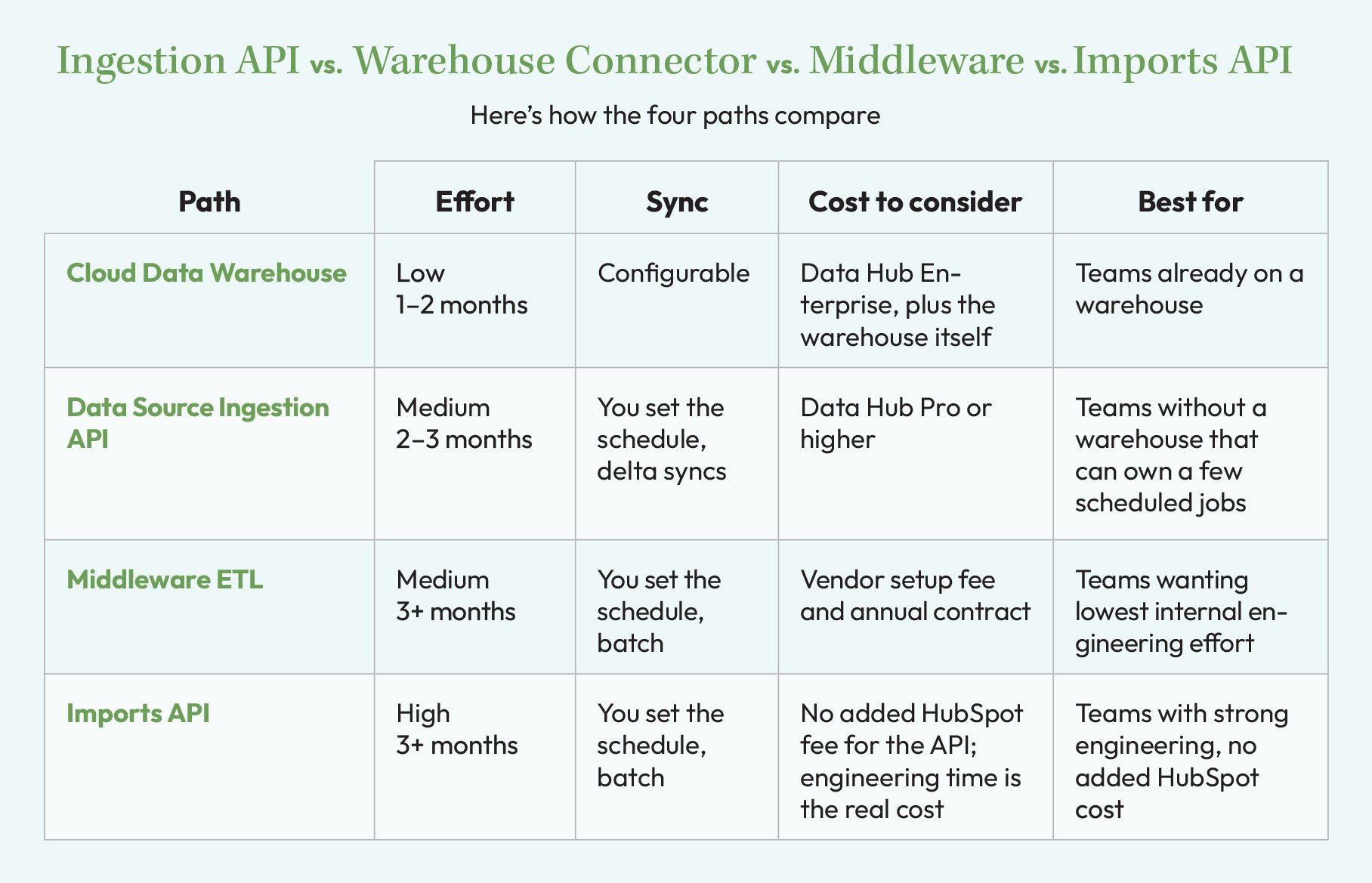
These timelines cover the data integration only, not a full HubSpot implementation, which typically runs four to six months.
For current pricing and what fits your setup, talk with GHA or your HubSpot rep.
If you're already paying for Snowflake or BigQuery, use that connector; it's less work. If you're not, and you don't want to hand this off to a vendor or build a custom pipeline in-house, the Ingestion API sits in the middle: more capable than a bare-bones import, less overhead than middleware.
What you get once it's connected
Once the extract is flowing, a few things open up that aren't available with a basic one-time import:
- A single, up-to-date view of each member in HubSpot, keyed to a unique ID, that marketing, sales, and service all work from. Your core stays the system of record.
- Segmentation and reporting on core data, such as product holdings, tenure, and loan status
- Workflows and campaigns triggered by changes in that data, like the CD renewal sequence
- Data Studio datasets that feed your CRM objects and properties, so one dataset can power marketing, sales, and service
The data comes in through Data Studio and works alongside your standard objects. Contacts, companies, and deals keep their place. We build on top of them with custom objects for accounts, loans, shares, and cards, and sync the properties your teams need, so the CRM matches how a financial institution actually operates.

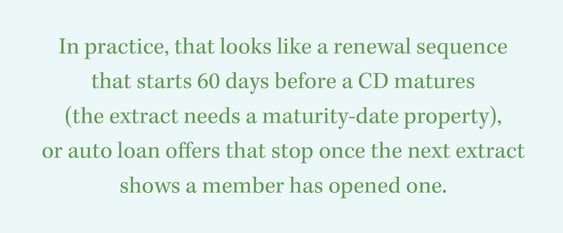
In practice, that looks like a renewal sequence that starts 60 days before a CD matures (the extract needs a maturity-date property), or auto loan offers that stop once the next extract shows a member has opened one.
What to keep out of the extract
Just because your core can export a piece of member or customer data doesn't mean it belongs in HubSpot. Product holdings, account status, and tenure usually earn their place; transaction-level detail and full account numbers usually don't. Have compliance sign off on the property list before the first sync. Federal privacy rules (GLBA's Regulation P, 12 CFR §1016.12) restrict sharing account numbers for marketing, so most institutions sync a member number or hashed ID instead. Check the list against your privacy notice and your vendor-management program; for credit unions, that includes NCUA's Part 748 safeguards guidance.
Is the Data Source Ingestion API right for your credit union?
This path makes the most sense for institutions that:
- Don't already have a cloud data warehouse in place
- Want ongoing member data synced automatically, not a one-time CSV dump
- Have some technical capacity (in-house or a contractor) to build and maintain a small set of extracts, but not the bandwidth for a full ETL build or a vendor contract
That describes a lot of the credit unions and community banks we talk to, especially ones without a dedicated data team. It's not the zero-effort option, but it's the one that gets you real, ongoing data flow without the biggest price tags on the list.
Frequently Asked Questions
How is this different from a regular CSV import?
An import is a one-time snapshot you redo by hand. The Ingestion API runs on a schedule, sends only what changed, and feeds your CRM objects and properties through Data Studio.
Can we reuse the extract our core already produces?
Often, yes, as long as it can be delivered as a flat file or JSON with consistent column names and types. It gets mapped once; after that, it's the same scheduled job.
Next Steps
If you're weighing this against a warehouse migration or a middleware contract, the next step is a discovery assessment: a scoped engagement under a statement of work, not a packaged product, that looks at your core extract, data quality, and HubSpot tier before you commit to a path. GHA holds HubSpot's CRM Implementation Accreditation, and you can see a real credit union integration build in our case study. To scope a discovery assessment, talk with GHA or your HubSpot rep.
Not ready for that conversation yet? Start with how unified data shapes a credit union CRM implementation or how to choose a credit union CRM.
