

If you're evaluating CRM implementation services for credit unions, the question you're really asking isn't "should we use HubSpot?" You've probably already answered that one. If you haven't, here's how to evaluate implementation partners before you get to this stage. The real question is: who can actually implement this without breaking our operations?
That's a harder question to answer, because most implementation partner pages don't help you answer it. They lead with certifications and badges: Platinum Partner, Diamond Partner, whatever tier, and follow up with generic promises about "streamlining your member journey." What they don't tell you is what actually happens between signing the contract and going live: what gets audited, what gets built, what breaks, and how long each piece really takes.
This post walks through the real phases of a credit union HubSpot implementation, in order, with the timelines and decisions that come with each one. No black box, no vague reassurances, just proof by demonstration, not by claim, of what the work looks like.
Why Credit Unions Are a Different Implementation Than a Typical HubSpot Rollout
A generic HubSpot rollout for, say, a SaaS company or an e-commerce brand is fairly linear: connect your website, import your contacts, build some workflows, done. A HubSpot credit union implementation carries a different set of constraints from day one.
Regulatory and data privacy expectations. Member data isn't just customer data; it's subject to NCUA expectations and broader financial privacy obligations that shape what can be stored, who can see it, and how it moves between systems. Field-level permissions and audit trails aren't optional extras; they're baseline requirements.
Legacy core banking systems. Almost every credit union runs on a core banking platform that predates HubSpot by a decade or two. That system is the source of truth for accounts, balances, and transactions, and it wasn't built with modern API integrations in mind. Most of the real implementation complexity lives in the handoff between HubSpot and core.
Multiple business lines under one roof. Lending, deposits, and member services often need shared visibility into a member relationship, without each team having unrestricted access to data outside its lane. That's a permissions and data-architecture problem before it's ever a marketing automation problem.
This is why generalist HubSpot partner experience doesn't transfer directly. The platform is the same; the constraints around it aren't.
Phase 1: Discovery & Data Architecture
Before any configuration gets written, we audit three things: where member data actually lives, how it's currently segmented (if at all), and the structure of your core banking exports.

This is where CRM data model design for financial institutions gets decided, and it's worth going into some technical depth here because it's the part most implementations skip past too quickly. The decisions made in this phase, like object structure, custom property architecture, and the permissions model layered on top, determine almost everything that happens downstream. Get the data model wrong here, and you're rebuilding it six months into the project instead of adjusting a workflow.
Typical discovery work includes:
- Mapping every source system that touches member data (core banking, loan origination, online banking, existing spreadsheets or shadow databases)
- Reviewing existing segmentation logic, if any exists, and identifying where it breaks down
- Documenting the core banking export structure: what fields are available, how often they refresh, what's missing
- Defining the object structure before a single HubSpot property gets created
Discovery typically runs a few weeks on its own, and it's tempting to rush it. We don't recommend that. Everything after this phase depends on getting it right.
Phase 2: Core Banking Integration
"Integration" gets used loosely in this space, so it's worth being specific about what it actually means in practice. 
A core banking integration involves defining:
Sync direction: is data flowing one-way from core to HubSpot, or bidirectionally? Most credit unions land on one-way sync from core banking into HubSpot for account and product data, with HubSpot remaining the system of record for marketing and engagement data.
Refresh frequency: real-time sync is rarely necessary and often not supported by the core platform. Most implementations land on scheduled syncs (nightly or several times a day), which is sufficient for marketing and member-service use cases.
What data does and doesn't move: account balances and product holdings typically sync; transaction-level detail usually doesn't, both because of volume and because it's rarely needed in a CRM context.
Common core banking platforms in the credit union space each have their own export quirks and constraints, and part of this phase is setting realistic expectations about what's possible versus what a vendor's marketing page implies is possible. This is also where DIY implementations and generalist-partner projects most often run into trouble, not because the integration is impossible, but because nobody scoped the actual limitations of the core platform before promising real-time bidirectional sync.
Phase 3: Custom Objects for Financial Services Data
HubSpot's standard objects such as contacts, companies, and deals are built around a B2B sales model. They don't map cleanly onto the relationships that actually matter at a credit union: a member can hold multiple accounts, multiple products, and belong to a household with shared or overlapping financial relationships.
This is where custom objects come in. A member isn't just a contact; they're a contact with one or more accounts, each with its own product type, status, and lifecycle. A household might connect several members together in ways that matter for marketing (a joint auto loan) without collapsing their individual member records into one. 
As a concrete (anonymized) example: a common custom object build pairs an "Account" object with a "Product" object, linking both back to the member contact record and, where relevant, a household grouping. That structure lets marketing automation trigger off product-level events (a CD maturing, a loan reaching a certain point in its term) without needing custom code outside HubSpot. We've documented a real credit union custom object build that walks through this in more detail.
This is also the section most competitors skip entirely in their own content and, frankly, in their own implementations. It's easier to sell HubSpot's out-of-the-box objects and hope they're close enough. They usually aren't close enough for a credit union's actual data relationships.
Phase 4: Member Data Migration
This is the step everyone worries about most, and for good reason; it's the one place where a mistake is visible to members directly.
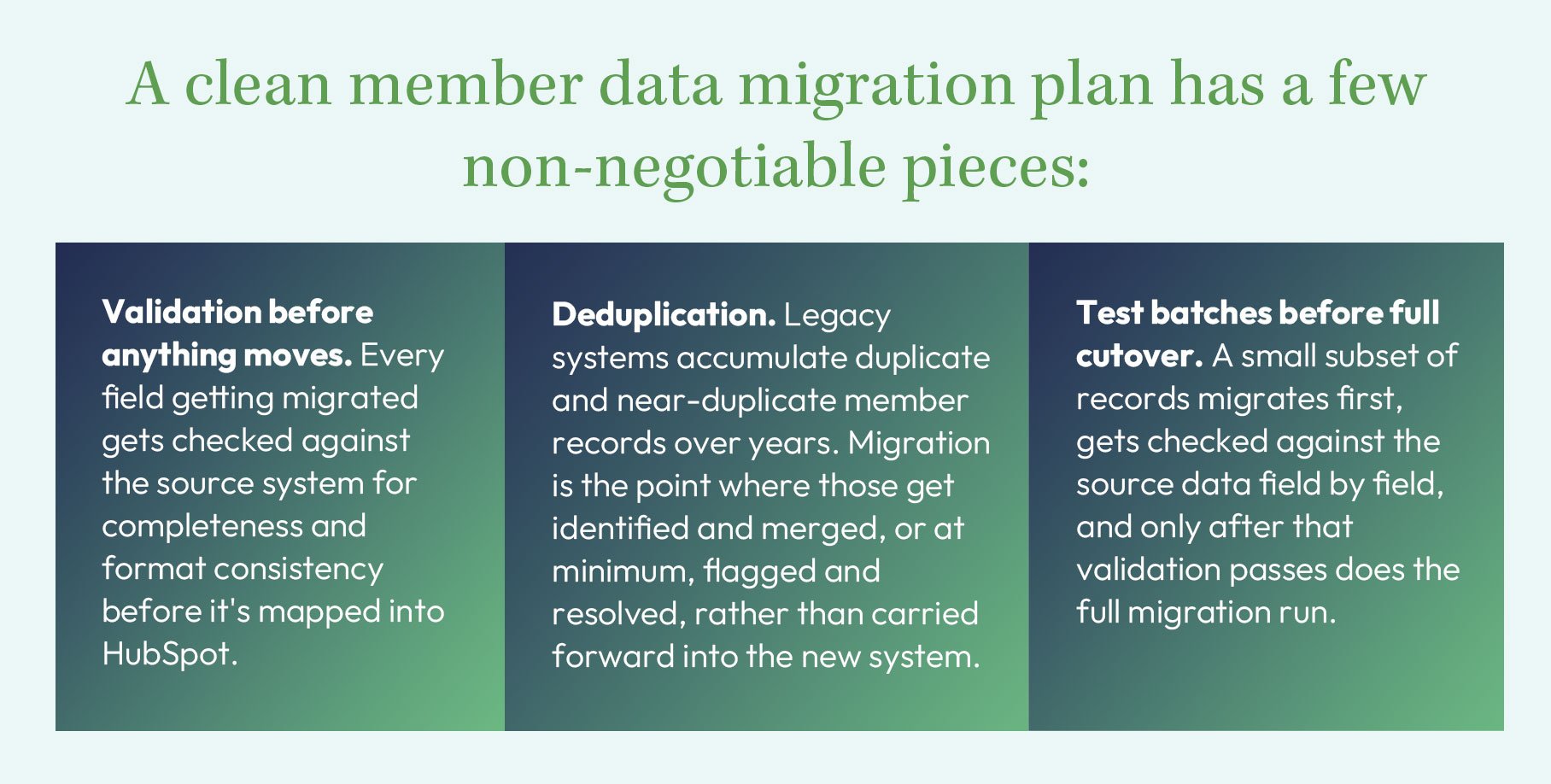
Skipping any of these three steps is how you end up with duplicate member profiles, mismatched account associations, or missing fields three weeks after go-live, problems that are much harder to fix once marketing automation is already running against that data. Done well, this looks like clean migration and integration work in practice.
Phase 5: Marketing Automation Setup
Once the data architecture, integration, and migration are solid, marketing automation is the payoff phase, not the starting point.
This is a distinction worth sitting with, because it's the opposite of how a lot of implementations get sold: a flashy automation demo up front, with the data and integration work treated as an afterthought. In practice, automation built on an unstable data foundation breaks in ways that are hard to diagnose, because the workflow itself isn't the problem; the underlying data is.
With the earlier phases in place, the automation typically built first includes:
- Onboarding flows for new members and new account holders, timed against actual account-opening events pulled from core banking
- Cross-sell triggers based on product holdings and lifecycle stage (a member approaching the end of a CD term, for instance)
- Compliance-safe messaging cadences that respect opt-in status, communication preferences, and applicable frequency or disclosure requirements
None of this works reliably if the object structure or the sync from core banking is unreliable. That's why the earlier phases aren't optional shortcuts; they're what makes this phase possible at all.
Realistic Timeline: What This Actually Takes
Almost nobody in this space publishes real numbers, so here's a phase-by-phase range based on how these projects actually run. In total, expect roughly four to six months from discovery through go-live, with the range mostly driven by core banking complexity and internal data quality.
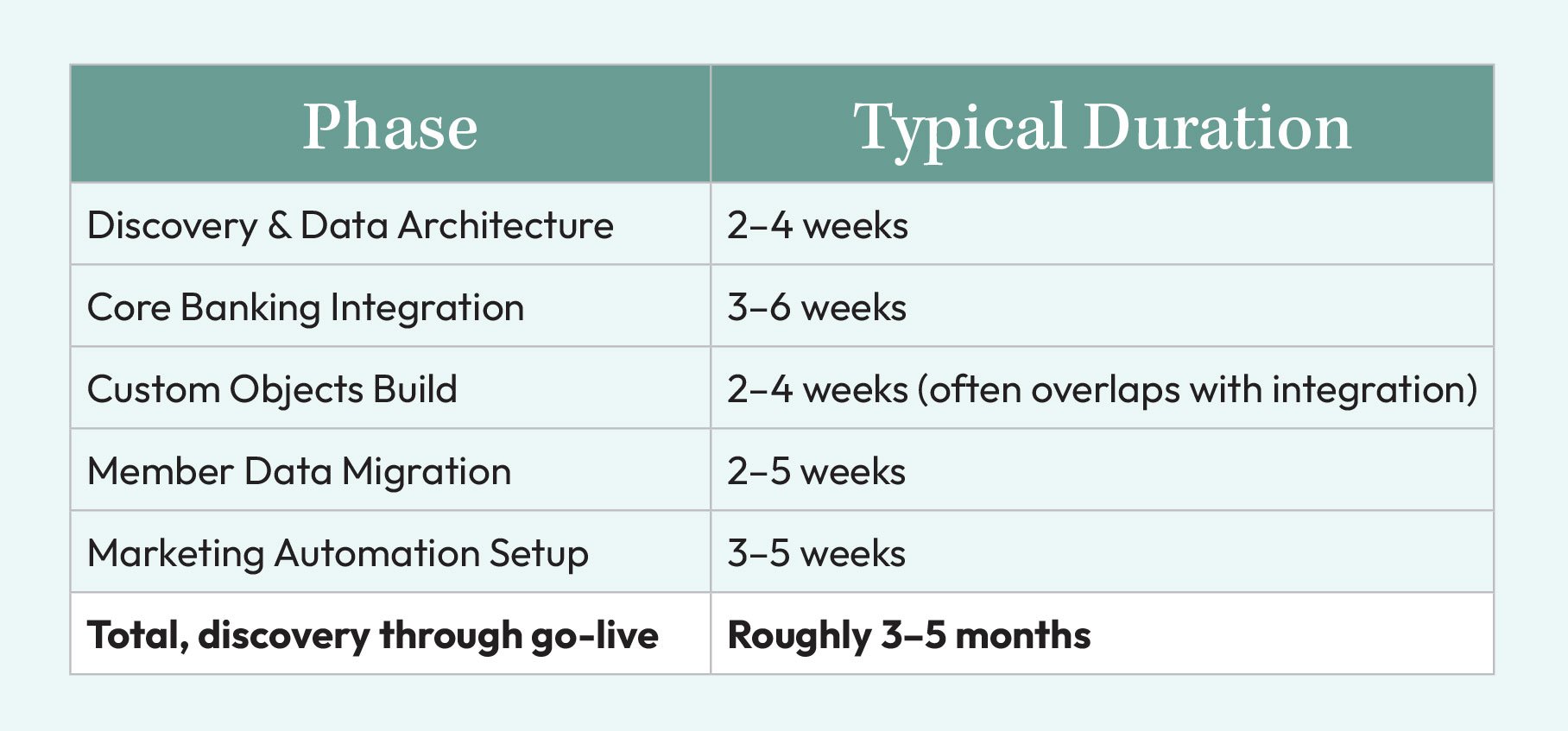
A few variables push that range in either direction:
Core banking system complexity. Some platforms expose clean, well-documented export APIs. Others require manual file-based exports or third-party middleware, which adds real time to the integration phase.
Internal stakeholder availability. Discovery and migration validation both depend on your team's time, data owners confirming field mappings, and compliance reviewing the permissions model. Projects stall when this availability isn't planned for up front.
Data quality at the start. A credit union with years of inconsistent data entry or multiple overlapping legacy systems will spend more time in deduplication and validation than one with a single, relatively clean source system.
These ranges assume a mid-sized credit union with one core banking platform and no major shadow-IT data sources to reconcile. Larger or more fragmented environments extend the timeline accordingly.
What Sets a CRM Implementation Partner Apart for Credit Unions
Back to the original question: who do you actually choose as your HubSpot implementation partner for a credit union?
The honest answer is that the differentiator isn't the certification tier or the size of the partner logo. It's whether they can walk you through named phases and named deliverables before you sign anything, discovery findings, a documented data model, a defined migration plan, and a realistic timeline with the variables that could shift it.
That's the approach GHA takes on every credit union implementation: proof by demonstration, not by claim. We're also a holder of HubSpot's CRM Implementation Accreditation. If a partner can't tell you what happens in week three of your specific project, that's worth noticing before you commit six months and your member data to the answer.
Next Steps
If you're at the point of scoping this for your credit union, the next step is a discovery assessment, a structured look at your specific core banking setup, data quality, and business line structure before any commitment to a build. Talk to GHA about a discovery assessment for your credit union.
If you're earlier in the process and not ready for that conversation yet, our guide to choosing a CRM for credit union digital transformation walks through what to evaluate before you talk to any implementation partner.
